
In this guide (9 sections)
A token economy is a star chart with rules: your child does a task you agreed on, gets a star straight away, and trades stars for something they want. It is the tool behind every sticker chart, marble jar and points system, and it works. It also fails in the same predictable ways every time, so the rules matter more than the chart.
Below is the system we start every child with in our app, written out so you can run it on paper tonight. Three tasks, two rewards, five rules, a week-by-week plan, and what to do when it stalls.
The system in one minute
- Three tasks your child does not already do, worth 1 to 3 stars each.
- Two rewards: one they can earn by tomorrow, one worth waiting for by the weekend.
- Stars come immediately, only for the tasks on the list, once a day per task, and are never taken away.
- Two weeks of a task done without reminders, and it comes off the chart. When the list is empty, you are done.
- Track it wherever you like: paper on the fridge, a notes app, any chart app, or Star Rewards in our app, which was built for exactly this.
That is the whole thing. The rest of this article is how to set it up and keep it running.
Step 1: Pick three tasks
Choose the three things you are tired of reminding your child about. Not ten. Three is enough to change the tone of a morning, and small enough that a child can see a path to the reward. The tasks should be things they can do today with no new skill required, and things they do not already do on their own, because a star for something a child already enjoys makes it a chore.
These are the starter tasks in our app, by age:
| Age | Task | Stars |
|---|---|---|
| 5 to 7 | Brush teeth | 1 |
| 5 to 7 | Make the bed | 1 |
| 5 to 7 | Go to bed on time | 2 |
| 8 to 12 | Complete homework | 2 |
| 8 to 12 | Read for 20 minutes | 2 |
| 8 to 12 | Clean your room | 2 |
Swap in your own. Feeding the pet, setting the table, getting dressed without a fight, turning screens off when asked. Keep the wording concrete enough that both of you will agree when it has been done. “Be good” is not a task. “Clothes in the basket before bed” is.
Step 2: Give each task a value
One star for the small routine things. Two for the ones that take real effort. Three for the one your child genuinely dreads: studying for a test, trying a new food, staying calm when told no. Write the number next to the task where your child can see it, and do not change it once the week has started. A star your child can count on is worth more than a clever one.
Three tasks at these values earn four to six stars on a good day. Keep that number in your head for the next step.
Step 3: Pick two rewards
The first reward should be reachable by tomorrow. The second should take most of a week. That pairing is the whole design: a quick win so the chart feels real on day one, and a bigger goal so there is a reason to keep going.
| Reward | Stars | Reachable |
|---|---|---|
| An extra bedtime story | 3 | Tomorrow |
| 15 minutes of extra screen time | 3 | Tomorrow |
| 30 minutes of extra screen time | 5 | Day two |
| A trip to the park | 10 | The weekend |
| Picking the film on movie night | 10 | The weekend |
| A playdate | 12 | The weekend |
Rewards are things your child wants, not things you want them to want. Screen time is fine. A trip somewhere is fine. Pocket money is fine for older children. What must never be on the list is anything your child should have anyway: dinner, a bedtime story they have always had, your attention. If a child can lose those by not earning stars, the chart has become a threat.
Let your child help choose. A reward they picked is worth twice one you picked for them.
Step 4: Set the rules together
Sit down with your child for five minutes and agree these out loud. Say them in your own words; the point is that the child knows the rules before the first star, not after the first argument.
- The star comes the moment the task is done. Not at bedtime, not on Sunday. If you cannot give it in the moment, mark it and give it within the hour.
- Only tasks on the list earn stars. No stars for stopping a tantrum, no stars for being nice to the dog. That is what praise is for. If you start paying for things that were not agreed, you will be negotiating over everything by Wednesday.
- A task counts once a day. The bed made twice is still one star.
- Stars are never taken away. Ever. If a behaviour needs a consequence, use a different tool. Stars only go up. This is the rule parents break most, and the one that kills charts fastest.
- Who says it is done. Under about eight, you check the task and give the star. From about eight, your child ticks it off themselves and you trust them. If the trust is misplaced, go back to checking for a week without making it a punishment.
Step 5: Track it
The chart only needs three things: the tasks with their values, the days of the week, and a running star total next to the reward prices. Anything that shows those where your child will see them several times a day will do.
On paper. A sheet on the fridge, tasks down the side, days across the top, a star in the box the moment the task is done. Reward list and prices underneath, and a total your child updates themselves. When a reward is bought, cross out the stars it cost. This is the simplest version and it works well for one child and one parent who is usually the one at home.
In a notes app, a shared calendar, or any chart app. Same layout. The one thing to watch is that the chart stays visible to the child, not buried on your phone. If they cannot see it without asking, it is not doing its job.
In our app. Star Rewards in Encyclopedia: Kids Learning is this chart with the rules enforced for you, and it takes about five minutes to set up. A new child profile already starts with three tasks and two rewards for their age, so most of the setup is checking what is there.
- Open the menu and tap Parent Dashboard. Enter your PIN, or create one if this is the first time.
- The Reward good habits card is already switched on, with the starter tasks and rewards. Under Who manages the stars?, choose Parent approves for a younger child or Child self-manages for an older one. You can change this at any time.
- Tap Edit tasks & rewards. On the Tasks side, tap Browse task examples to pick from the built-in list, or Add a task to write your own. Each task has a name, Stars earned (1, 2, 3, 5 or 10), How often (Daily, Weekly or One-time) and a time of day. Drag the handles to put them in the order of the day.
- Switch to Rewards. Browse reward examples or Add a reward, each with a name and a Star cost. Keep it to two.
- Hand the phone or tablet to your child. From the menu they open Star Rewards, tick the tasks they have done and tap Done. In self-managed mode the stars land at once. In parent-approves mode they see “Sent to a grown-up to check”, and you get a Review button: enter your PIN, remove anything that was not actually done, and tap Approve all.
- To spend, your child opens the Rewards tab, taps a reward they can afford and taps Get it!. The app shows a voucher with their name and the reward on it and the words “Show this to a parent”. You deliver the reward.
A few things the app does for you. A daily task cannot be claimed twice before tomorrow, so the argument about whether the bed counts twice never happens. There is a Give bonus button on the balance card, behind your PIN, and no button for taking stars away. Once one child’s board is working, the copy icon at the top of the board puts the same tasks and rewards on a sibling’s profile; note that it replaces whatever that sibling had. And the switch on the Reward good habits card turns the whole thing off for that child without deleting anything, so it can be paused and brought back.
If your child likes to compete. The Leaderboard in the menu has a Top Helper tab that ranks children by tasks completed this month, across everyone using the app, and resets monthly. It counts tasks, not stars, so a one-star task counts the same as a three-star one. Children appear under the profile name and avatar you set up, and there is currently no way to opt a child out, so use a first name or a nickname for the profile if you would rather they were not identifiable. Some children are motivated by it. Others are not, and it can be ignored.
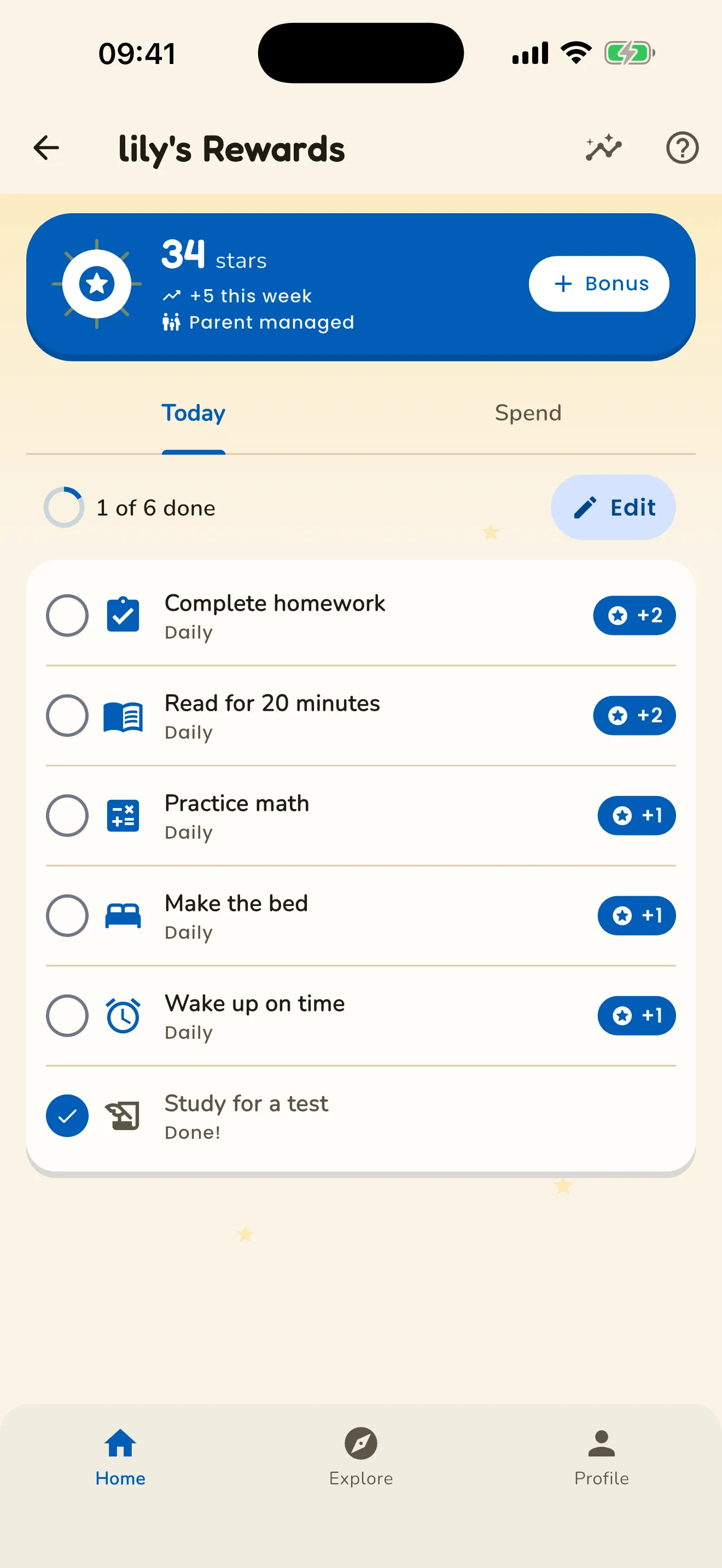
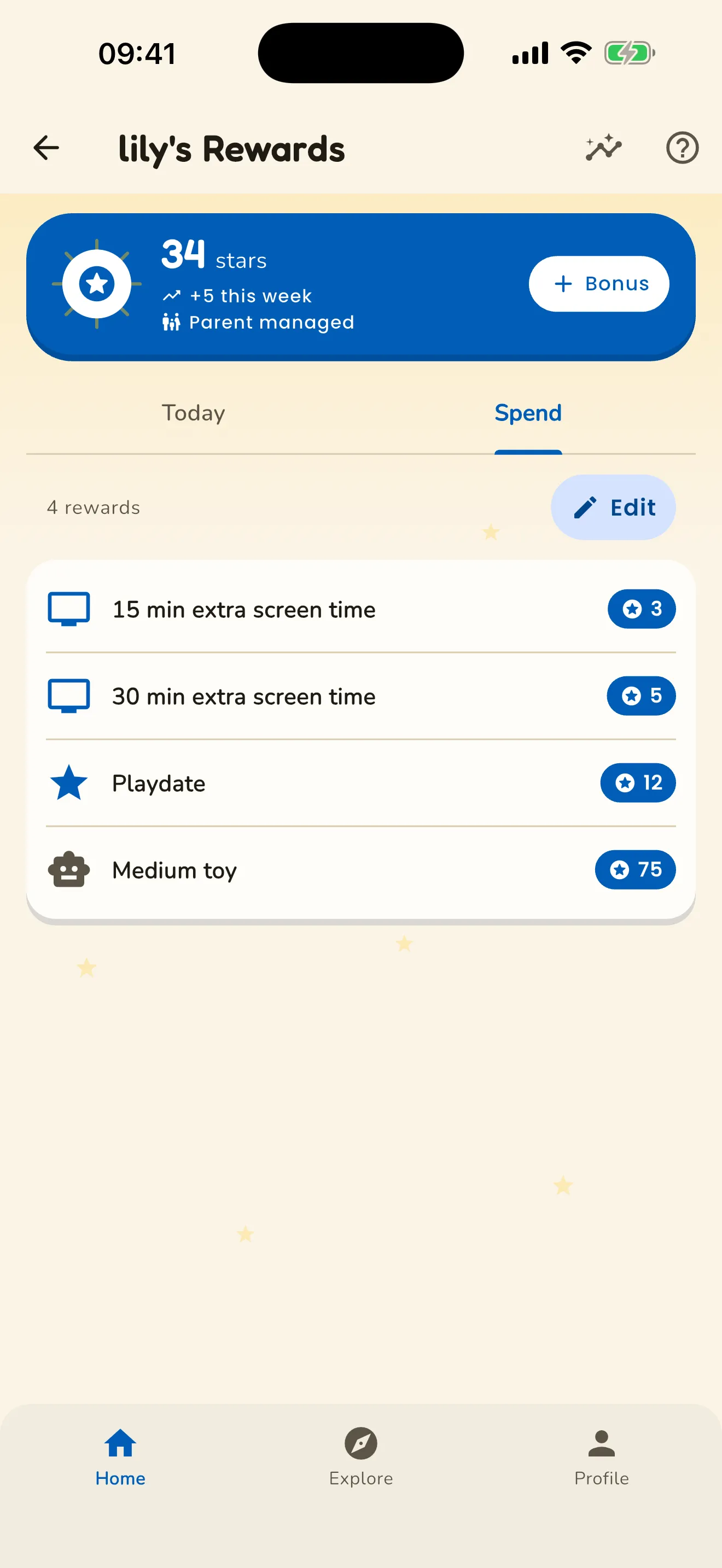
Either way, the rule is the same: the chart lives where your child can see it several times a day. A chart nobody looks at is not a chart.
Week by week
Week 1: make it easy to win. The only goal this week is that the first reward lands by day two. If your child has not earned the small reward by Wednesday, the tasks are too hard or the price is too high. Fix the chart, not the child: on paper, cross out the price and write a lower one; in the app, open the reward and change its Star cost. Give stars generously and immediately, and say what the star was for every time: “That’s a star for the bed.”
Week 2: hold the line. The novelty fades this week and the pushback starts. Do not add tasks, do not raise prices, do not skip a star because you were busy. This is the week to start using bonus stars, sparingly, for something that went beyond the list: helping a sibling without being asked, a task done before you mentioned it. One or two a week. If they become routine they stop meaning anything.
Weeks 3 and 4: swap, don’t stack. By now one task is probably happening without a reminder. Take it off the chart and say why: “You don’t need a star for teeth anymore, you just do it.” Put a new task in its place. The chart should always have about three things on it, and they should always be things that are not yet automatic. Raise the weekend reward a little if your child is earning more stars than the prices assume.
When to stop. A task that has been done without reminders for two weeks comes off. When you cannot think of a third task worth putting on, the chart is finished, and that is the outcome you were aiming for. Tell your child the chart is retiring because they don’t need it, and keep the praise going. Some families bring it back for a new phase, a new school year or a new sibling. That is fine. It is a tool, not a way of life.
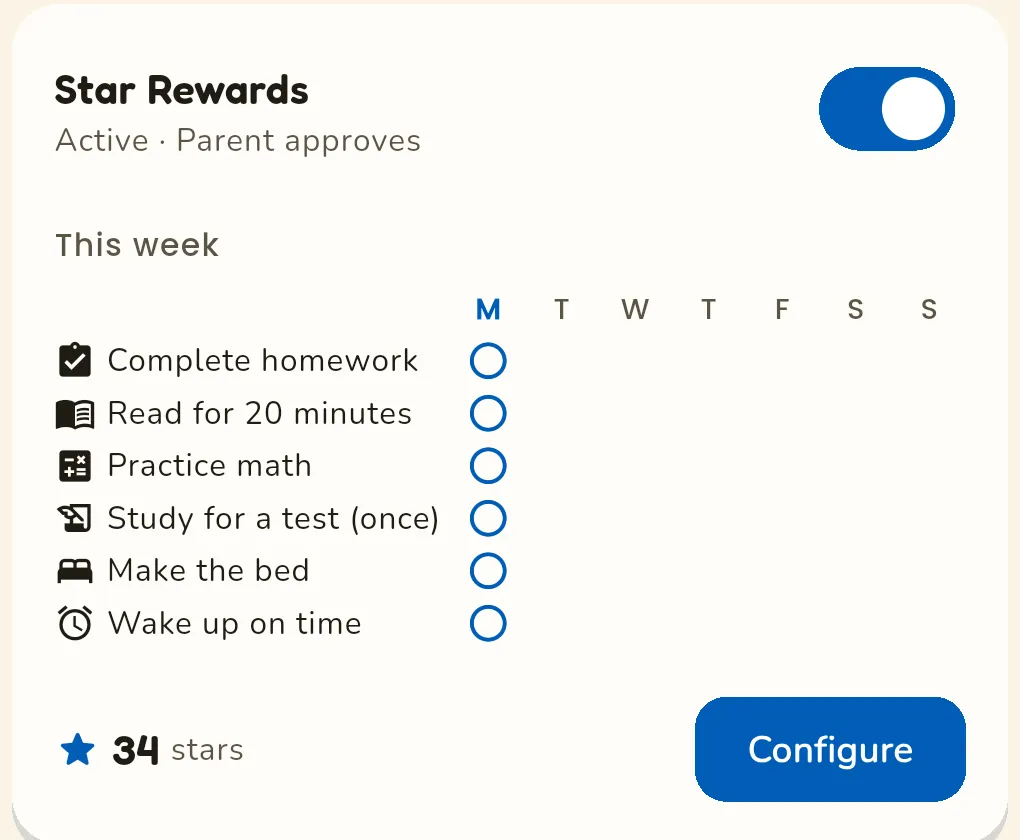
When it stalls
They only ever do the easy one. Expected. The one-star task is doing its job, which is proving the chart pays. Leave it, and make sure the weekend reward needs the two-star tasks to reach in time. If the reward is reachable on one-star tasks alone, the price is too low.
They lost interest by Thursday. Nearly always the first reward came too late. Cut the price of the small reward until it lands on day one or two next week, and check that the reward is one they chose.
They want to spend everything on day one. Let them. A child who buys the small reward on day one has learned the chart is real, which is the only lesson week one needs to teach. Saving comes when there is something worth saving for.
We argue about whether it counts. The task is written too vaguely. Rewrite it so a stranger could judge it. “Tidy room” becomes “floor clear and bed made.” In the app, the once-a-day rule removes the other common argument.
I forgot to give the star. Give it as soon as you remember and say so. A late star is far better than a missed one. If you are forgetting daily, move the chart to where you will see it, or to your phone.
They did something awful and I want to take stars away. Don’t. Handle the behaviour separately, however you normally would. The moment stars can go down, every star becomes a threat, and the chart stops being about what your child did and starts being about what you might do.
My child has ADHD. Reward systems like this are among the best-established behavioural approaches for ADHD, and children with ADHD tend to respond to immediate, consistent rewards particularly well. Keep the rules tighter than you think you need to: immediacy matters more, the list should be shorter, and the first reward should be closer.
It’s been three months. The chart has become the terms of the household. Retire the tasks that are automatic, and if none are, the tasks were too big to begin with. Break them into smaller ones and start the four-week plan again.
Why this works
None of the rules above are opinions. Reward systems have been tested for sixty years and they reliably increase a behaviour while they run. What they can do badly is teach a child that a task is only worth doing for the sticker, and the research is specific about when that happens: when a child is rewarded for something they already liked doing, and when the reward feels like control rather than information. That is why the chart is only for things your child does not yet do, why stars are never taken away, and why it is designed to end. The CDC, the Raising Children Network and the American Academy of Pediatrics give parents the same rules in their own guidance: reward immediately, keep the list short, never remove a reward that was earned, and phase the programme out as the habit forms. The studies are listed at the foot of this page for anyone who wants them.
One last thing about our app, because it is a deliberate choice. Stars are earned only for the tasks you set. Reading in the app never earns a star, because reading is the one thing we most want a child to do for its own sake, and nothing in the app is ever locked behind stars. A reward system that gates content is a paywall with a sticker on it. Whatever app you use, that is the first thing to check.
Sources (8)
- Kazdin, A. E. (1982). The token economy: A decade later. Journal of Applied Behavior Analysis, 15(3), 431–445.
- Deci, E. L., Koestner, R., & Ryan, R. M. (1999). A meta-analytic review of experiments examining the effects of extrinsic rewards on intrinsic motivation. Psychological Bulletin, 125(6), 627–668.
- Cameron, J., Banko, K. M., & Pierce, W. D. (2001). Pervasive negative effects of rewards on intrinsic motivation: The myth continues. The Behavior Analyst, 24(1), 1–44.
- Maggin, D. M., Chafouleas, S. M., Goddard, K. M., & Johnson, A. H. (2011). A systematic evaluation of token economies as a classroom management tool for students with challenging behavior. Journal of School Psychology, 49(5), 529–554.
- Pelham, W. E., & Fabiano, G. A. (2008). Evidence-based psychosocial treatments for attention-deficit/hyperactivity disorder. Journal of Clinical Child & Adolescent Psychology, 37(1), 184–214.
- Centers for Disease Control and Prevention. Tips for using praise and rewards. Essentials for Parenting Toddlers and Preschoolers.
- Raising Children Network (Australia). Reward charts for kids: how they work.
- American Academy of Pediatrics, HealthyChildren.org. Positive reinforcement through rewards. Adapted from Caring for Your School-Age Child: Ages 5 to 12.